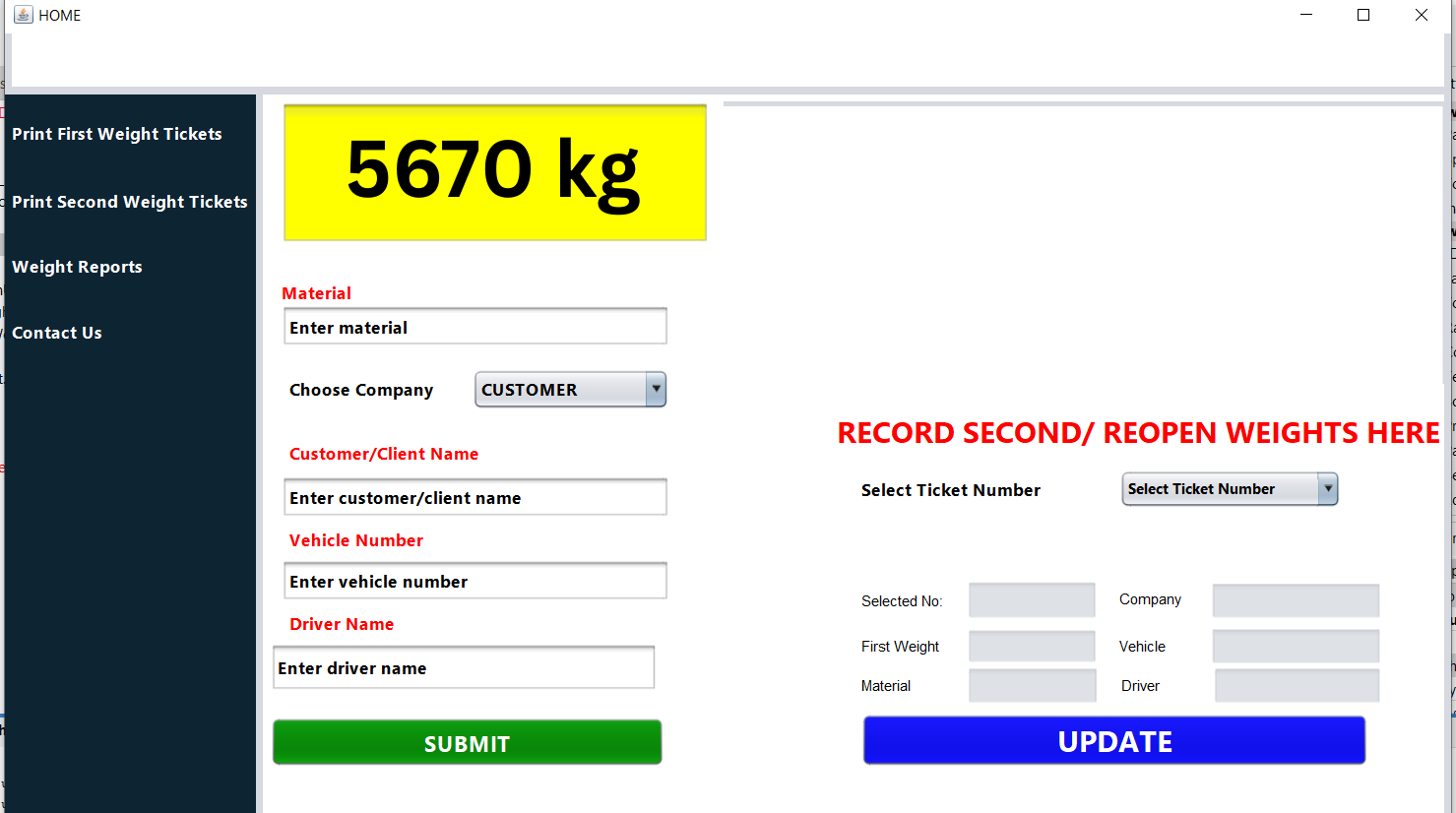
Weighbridge App Remote Database With No Camera – Java & MySQL
Firstly, Weighbridge App Remote Database With No Camera developed using Java and MySQL, offers a streamlined, reliable, and secure solution for automated vehicle weight management. Unlike many generic systems, this particular application does not include camera integration. However, it delivers seamless data processing through a remote-based MySQL database. Designed for high performance, it ensures accurate data capture and real-time reporting for industrial operations.
Second, not only is it platform-independent, but it is also modular. Therefore, it can be scaled as per the requirements. Since the backend is MySQL, it ensures reliability. Furthermore, the remote database allows secure cloud-like accessibility. This feature eliminates the need for on-site data storage. Consequently, data is safer and easier to manage.
Besides, the software is user-friendly. So, even non-technical users can operate it efficiently. As a result, it integrates well with existing enterprise systems. In other words, you can make it part of a broader workflow. With minimal training, your team can start using it right away.
Choose How To Buy
Features Of Weighbridge App Remote Database With No Camera |
-Developed using Java. -Uses MySQL. -Remote database: hence, access of data from any location -No camera dependency. -Role-based access. -Real-time processing. -Data backup options. -Seamless integration. -Minimal training required: Quick onboarding for staff -Cost-effective: Affordable setup with long-term savings -Multi-terminal support: Manage multiple weighbridges simultaneously -Customizable reports: Export to Excel -Lightweight User Interface. -Zero camera maintenance. -Secure login. -Cloud-ready. |
Application Areas |
-Mining sites. -Construction zones. -Cement plants. -Ports and harbors -Municipal landfills -Logistics hubs: Audit freight weight before transport. -Agriculture. -Scrap yards. -Factories. -Toll gates. -Oil refineries. -Border check posts. -Industrial parks: Centralized monitoring for multiple. weighbridges. |
⚙️ Necessary Requirements For Weighbridge App Remote Database With No Camera |
-Internet connection required since it uses remote database access. -Windows/Mac Os OS (64-bit preferred) -Weighbridge hardware with digital output interface -Printer (optional) for ticket generation. -LAN/Internet-enabled PC for client access. -Administrative credentials for installation. -UPS backup for uninterrupted operations. -Excel (or compatible) for data exports. |
🔄 Why Choose Weighbridge App Remote Database With No Camera? |
In summary, moreover, the system runs efficiently. Even if you’re in a remote area, your data remains centralized. Thus, operations never get interrupted. When hardware is minimal, your maintenance costs drop. Not to mention, you avoid camera-related failures. And finally, since reports are digital, no paper trails are needed. |
Contact Us Today for any inquiries

Reviews
There are no reviews yet.